qixinwei-pcba


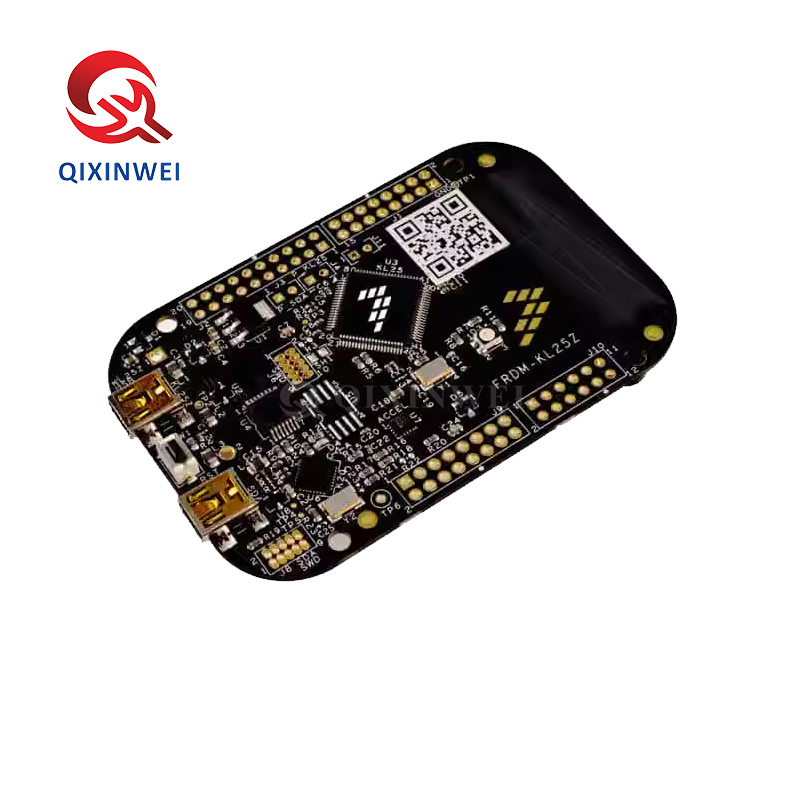
FRDM-KL25Z Development Board ARM Cortex-M0+ Kinetis L MCU Evaluation Board
FRDM-KL25Z is NXP's ultra-low-cost dev board based on ARM Cortex-M0+ Kinetis KL25Z128VLK4 MCU, 48MHz, 128KB Flash, 16KB SRAM. Onboard OpenSDA debugger, capacitive touch slider, MMA8451Q accelerometer, RGB LED, Arduino R3 headers. Supports mbed, Zephyr OS, Processor Expert. For IoT prototyping, motor control, portable medical devices
FRDM-KL25Z Development Board Features:
1. Onboard MKL25Z128VLK4 MCU clocked at 48MHz 128KB Flash 16KB SRAM USB OTG(FS) LQFP80
2. Capacitive touch slider MMA8451Q acceleration sensor three-color LED light
3. Can be powered by USB/lithium battery/external power supply
4. Convenient to reference MCU I/O
5. The power supply voltage can be measured by electric shock
6. R3 can be configured to be compatible with Arduino
7. Onboard OpenSDA debugger
FRDM-KL25Z Development Board Core Processor
◆ Main MCU
MKL25Z128VLK4 (NXP Kinetis KL2x series)
◆ Processor Core
ARM Cortex-M0+, 32-bit
◆ Debug Interface
OpenSDA (onboard debugger with MSD flash programming and run-control debugging)
FRDM-KL25Z Development Board Memory Specifications
Onboard Peripherals
◆ Sensors
◆ User Interface
◆ Clock
8MHz external oscillator (FLL multiplies to 48MHz system clock)
Expansion Interfaces
◆ Arduino Compatible
Arduino R3 pin layout, supports shield expansion boards
◆ Other Interfaces
Easy access to all MCU I/O pins
Power Options
◆ Power Supply
◆ Low Power Features
Battery-ready design with power measurement access points
Development Tool Support
◆ Online IDE
Arm Mbed (no installation, no license required)
◆ Operating System
Zephyr OS (open source IoT OS)
◆ Traditional IDEs
Keil, IAR, Kinetis Design Studio, etc.
◆ Software Library
Processor Expert components (rapid embedded development)
◆ SDK
Kinetis Software Development Kit (KSDK)
USB Features
◆ USB Controller
Full-speed USB 2.0 On-The-Go (OTG)
◆ USB Ports
Applications
◆ IoT Prototyping
Zephyr OS and mbed OS support for quick IoT node development
◆ Motor Control
Low voltage H-Bridge product development
◆ Portable Medical Devices
Ultra-low power for battery-powered applications
◆ Embedded Learning
Low-cost platform with rich documentation
◆ Sensor Data Acquisition
Onboard accelerometer and touch input
◆ PC Peripherals
USB OTG support for host device connection
Key Advantages
◆ Ultra-Low Cost
NXP official entry-level development platform
◆ Tool-Free Programming
OpenSDA USB mass storage drag-and-drop download
◆ Dual USB Design
Separate debug USB and MCU USB ports
◆ Rich Onboard Peripherals
Accelerometer + touch slider + RGB LED
◆ Arduino Compatible
Reuse thousands of shield expansion boards
◆ Multi-IDE Support
From online mbed to professional IDEs
◆ Low Power Optimized
Battery-ready for portable devices
Why Choose QIXINWEI
Years of experience in the electronics industry. Trusted by global customers.
Massive In-Stock Inventory – Ready to ship promptly
BOM Matching Service – One-stop solution, save time
PCBA Customization – Professional engineering team creates tailor-made solutions based on your needs
Cost-Effective & Efficient – Better channel, better cost
A dedicated team makes your procurement smoother.
Contact us for BOM quotes or PCBA inquiries




Notes : Since the prices of the electronic components are unstable, the prices we show are for reference only. Please confirm
the recent prices with us before ordering!

FAQ:
What is the FRDM‑KL25Z development board and its key specifications?
The FRDM‑KL25Z is an ultra‑low‑cost evaluation board from NXP for the Kinetis L series KL25Z microcontroller. It features an ARM Cortex‑M0+ core running at up to 48 MHz, 128 KB of Flash, 16 KB of SRAM, and a rich set of peripherals. The board includes an on‑board OpenSDA debug/programming interface (CMSIS‑DAP/mbed), a 3‑axis accelerometer (MMA8451Q), a capacitive touch slider, a tri‑color RGB LED, and a USB OTG port. All I/O pins are brought out to Arduino™ R3‑compatible headers, making it easy to stack shields. The board can be powered via USB (5 V) or an external 5 V – 12 V supply.How does the FRDM‑KL25Z differ from an Arduino Uno?
While the Arduino Uno uses an 8‑bit ATmega328P, the FRDM‑KL25Z is powered by a 32‑bit ARM Cortex‑M0+ running at 48 MHz, offering significantly higher performance. It has 128 KB Flash (vs. 32 KB) and 16 KB SRAM (vs. 2 KB). The KL25Z also features native USB OTG, a built‑in accelerometer, and capacitive touch sensing. The board’s headers follow the Arduino R3 layout, so many 3.3 V‑compatible shields can be reused, but all I/Os are 3.3 V only — they are not 5 V tolerant. The FRDM‑KL25Z is ideal for projects that need more processing power, larger memory, and advanced on‑chip peripherals without increasing the physical footprint.How do I program the FRDM‑KL25Z? What development environments are supported?
The board works with multiple free toolchains: MCUXpresso IDE (Eclipse‑based, from NXP), Keil MDK (with free 32 KB limit), IAR EWARM, and the online Mbed OS compiler. For beginners, the Mbed Online Compiler is the simplest — just drag‑and‑drop a binary onto the board’s virtual USB drive. The on‑board OpenSDA debugger handles all programming and debugging over a single micro‑USB cable. No external programmer is required. The board also supports CMSIS‑DAP and SEGGER J‑Link (via firmware update) for advanced debugging.What is the OpenSDA debugger on the FRDM‑KL25Z, and how does it work?
OpenSDA is an on‑board, open‑source debugging and programming circuit that appears as a USB mass‑storage device when connected to a computer. You program the board by simply dragging and dropping a .bin or .srec file onto the drive. OpenSDA also provides a CMSIS‑DAP debug interface for single‑step debugging in IDEs like MCUXpresso or Keil. No external JTAG/SWD adapter is needed. The firmware can be updated to support SEGGER J‑Link or P&E Micro for additional debugging features.What on‑board sensors and peripherals does the FRDM‑KL25Z include?
The board comes with a MMA8451Q 3‑axis accelerometer (I2C), a capacitive touch slider (using the KL25Z’s TSI module), a tri‑color RGB LED, and a USB OTG connector. The accelerometer can be used for orientation detection, tap sensing, and motion monitoring. The capacitive slider demonstrates the KL25Z’s Touch Sensing Interface (TSI), enabling touch‑controlled projects without external components. The RGB LED is connected to PWM‑capable pins and can be used for status indication or light effects.What I/O pins and interfaces are available on the FRDM‑KL25Z? Is it Arduino compatible?
The board features Arduino R3‑compatible headers (UNO‑style layout), providing access to multiple digital I/O, PWM, analog input, UART, SPI, and I2C pins. In addition, the KL25Z’s specific features — like the TSI capacitive touch inputs and I2S audio bus — are available on the edge connectors. All I/O pins operate at 3.3 V logic levels; they are not 5 V tolerant. Many 3.3 V Arduino shields work directly, but 5 V shields require level shifters to avoid damaging the MCU.How do I power the FRDM‑KL25Z, and what is the typical power consumption?
The board can be powered via the micro‑USB port (5 V) or through the VIN pin (5 V – 12 V DC) on the Arduino header. A 5 V USB supply is sufficient for most projects and also provides the debug connection. The KL25Z microcontroller is optimized for ultra‑low power; in run mode at 48 MHz, it draws around 6 mA – 8 mA. It supports several low‑power modes, with VLPS (Very‑Low‑Power Stop) consuming as little as ~2 µA with wake‑up from an external interrupt or the on‑board RTC.Can I use the FRDM‑KL25Z with Mbed OS, and what are the benefits?
Yes, the FRDM‑KL25Z is fully supported by Mbed OS. The online Mbed compiler provides a large library of drivers, middleware, and examples that make it very easy to prototype IoT applications. You can program the board using the Mbed Online Compiler (no IDE installation needed) or with Mbed Studio (desktop). The Mbed OS includes an RTOS kernel, networking stacks, and sensor libraries, greatly accelerating development. The board is also supported in Zephyr RTOS and FreeRTOS.How do I download and debug programs on the FRDM‑KL25Z? Do I need an external programmer?
No external programmer is needed. The OpenSDA interface handles everything. For quick programming, simply drag‑and‑drop a firmware file (.bin or .srec) onto the board’s virtual USB drive (it appears as “FRDM‑KL25Z” in your file explorer). For debugging, the same USB connection provides a CMSIS‑DAP debug probe that works with MCUXpresso, Keil, and IAR. You can set breakpoints, watch variables, and step through code just as with an expensive external debugger.What are the most typical applications for the FRDM‑KL25Z?
It is widely used in educational microcontroller courses, IoT sensor nodes, wearable prototypes, home automation, motor control, and USB peripheral devices. Its low‑power ARM core, integrated accelerometer, capacitive touch, and Arduino‑compatible headers make it a versatile platform for learning embedded systems and rapidly prototyping connected products. It is also a popular choice for retro‑fitting older Arduino projects that need a performance boost without a complete hardware redesign.
- 系列:
- 开发板
- 描述:
- ARM Cortex-M0 + FRDM-KL25Z
- 型号:
- FRDM-KL25Z
- 类型:
- 开发板模块
- 原产地:
- Original
- 品牌:
- Original
- 制造商生产批次(日期):
- 最新
- 封装:
- 标准
- 功能:
- 标准
- 嵌入式:
- 标准
- 使用的 IC/零件:
- 标准
- A/D 转换器数:
- 标准
- 位数:
- 标准
- 采样率(每秒):
- 标准
- 数据接口:
- 标准
- 输入范围:
- 标准
- 放大器类型:
- 标准
- 输出:
- 标准
- 不同负载时的最大输出功率 x 通道数:
- 标准
- 电压-电源:
- 标准
- 板类型:
- 标准
- 主要用途:
- 标准
- 输出和类型:
- 标准
- 功率-输出:
- 标准
- 电压-输出:
- 标准
- 电流 - 输出:
- 标准
- 电压 - 输入:
- 标准
- 频率 - 开关:
- 标准
- 核心处理器:
- 标准
- 内置操作系统类型:
- 标准
- 平台:
- 标准
- 安装方式:
- 标准
- 电流 - 输出/通道:
- 标准
- 特性:
- 标准
- 每 IC 通道数:
- 标准
- 稳压器类型:
- 标准
- -3db 带宽:
- 标准
- 电流 - 电源(主 IC):
- 标准
- 电压 - 电源,单/双(±):
- 标准
- 传感类型:
- 标准
- 插口:
- 标准
- 灵敏度:
- 标准
- 模块/板类型:
- 标准
- 最大 IC 数:
- 标准
- 最长时间:
- 标准
- 感应范围:
- 标准