Electronic components
What Is a Microcontroller?
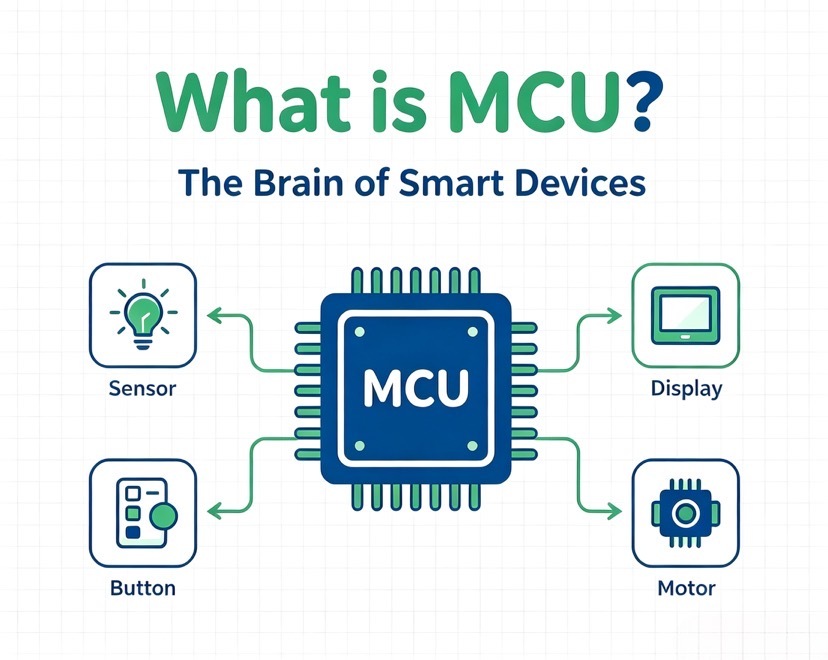
A microcontroller is a small, self-contained computer built into a single chip. It has a processor, program memory (Flash), working memory (RAM), and a set of input/output peripherals all on the same piece of silicon. You program it once, and it runs that program on its own to control a device — reading sensors, driving motors, talking to other chips, running a display, or flipping a relay at the right moment.
The short version: a microcontroller (often written MCU, from Microcontroller Unit) is the "brain" inside most embedded products. Your washing machine, wireless mouse, LED driver, e-bike controller, and industrial sensor all have one. It does not run a desktop operating system. It runs firmware, usually in a tight loop, responding to inputs in real time.
Microcontroller vs. Microprocessor: Don't Mix Them Up
People use these terms loosely, but the difference matters when you design or buy.
- Microprocessor (MPU) is just the CPU. It needs external RAM, external storage, and a bunch of support chips to do anything. Think of a PC or a Raspberry Pi's main chip.
- Microcontroller (MCU) puts the CPU, memory, and peripherals together on one chip. You can build a working product with very few extra parts.
So an MCU is for control — it lives inside a product and makes it work. An MPU is for computing — it runs heavier software and usually an OS. There is overlap: some chips called SoCs (System-on-Chip) blur the line, pairing an application-grade CPU with MCU-class peripherals. Rockchip's application processors, for example, sit closer to the MPU/SoC side, while an STM32 or GD32 sits squarely in MCU territory.
What's Actually Inside a Microcontroller
Open the datasheet of almost any modern MCU and you'll find the same building blocks:
- CPU core — the engine. 8-bit cores (8051, AVR, PIC) still ship in huge volume; 32-bit ARM Cortex-M cores (M0, M3, M4, M7, M33) dominate new designs because they're faster and better supported.
- Flash memory — where your program lives, non-volatile, so it survives power-off.
- SRAM — fast working memory for variables and the stack while the chip runs.
- Peripherals — the parts that let the chip touch the real world: GPIO pins, timers, PWM, UART, SPI, I2C, ADC (analog-to-digital), DAC, comparators, CAN, USB, Ethernet MAC, and sometimes wireless radios.
- Clock and reset — an internal or external oscillator sets the speed; the reset circuit brings it up cleanly.
- Debug interface — usually SWD or JTAG, so you can flash and troubleshoot the chip in circuit.
These blocks talk to each other over internal buses. On ARM-based parts, that's typically the AMBA bus structure (an AHB for the fast stuff, APB for slower peripherals). The point is the whole system is on one die, which is why an MCU board can be so small and cheap.
The Specifications That Actually Matter
When engineers compare MCUs, a few numbers decide the fit. Here's what to read first:
| Parameter | What it tells you | Why it matters |
|---|---|---|
| Bit width (8/16/32) | Size of data the core handles per operation | 32-bit handles bigger math and more complex code; 8-bit wins on cost and simplicity |
| Core / max frequency | How fast it processes | Higher MHz means more headroom for real-time tasks |
| Flash size | How much program you can store | Too small and your firmware won't fit; too big wastes cost |
| SRAM size | Working memory while running | Buffers, stacks, and RTOS need room |
| Peripheral set | Which interfaces are available | Must match your sensors, bus, and communication needs |
| Operating voltage | Supply range it tolerates | Must fit your power budget (battery vs. mains) |
| Package | Physical footprint (QFP, QFN, BGA, SOIC) | Drives board size, assembly cost, and rework difficulty |
| Temperature grade | Commercial / industrial / automotive | Industrial and automotive grades survive harsher environments |
Don't pick on headline MHz alone. A part with the right peripherals and enough Flash at a lower clock often beats a "faster" chip that's missing the interface you need.
How a Microcontroller Runs Your Code
The flow is simple in concept:
- You write firmware (in C/C++, sometimes Rust or assembly) and compile it.
- You flash the binary into the chip's Flash through the debug interface.
- On power-up, the chip runs a tiny startup routine, sets up the clock and peripherals, then jumps to your
main(). - Your code loops: read an input → decide → act → wait → repeat. Timers and interrupts let it react without wasting cycles polling.
Most MCU firmware is "bare metal" or runs a real-time operating system (FreeRTOS, Zephyr, RT-Thread) when the job is complex. That real-time behavior — responding predictably within microseconds — is exactly why MCUs, not general-purpose computers, run critical control loops.
Where Microcontrollers Show Up
Almost every powered device that isn't a phone or a PC has an MCU doing quiet work. Common spots:
- Consumer electronics — remote controls, headphones, small appliances, toys, LED lighting.
- Industrial — PLC front ends, motor drives, sensors, HMIs, building automation.
- Automotive — body control modules, lighting, sensors, BMS (battery management).
- IoT and wireless — ESP32-class parts bring Wi-Fi/Bluetooth so devices talk to the cloud.
- Medical and instruments — monitors, portable testers, dosing controls.
For overseas buyers, the same design question comes up everywhere: which MCU gives reliable performance at a workable cost, and can I actually keep it in stock? That's where sourcing strategy meets engineering.
Common MCU Families and How They Compare
A few families cover the bulk of production designs. This is a practical comparison, not a spec-sheet war:
| Family | Typical strength | Common use |
|---|---|---|
| STM32 (ST) | Huge range, mature tools, broad ecosystem | General embedded, industrial, automotive |
| GD32 (GigaDevice) | Cortex-M based, competitive cost, wide pin/package overlap with STM32 in many lines | Cost-sensitive replacements and new designs |
| ESP32 (Espressif) | Integrated Wi-Fi + Bluetooth, strong dev community | IoT, connected products, prototyping |
| STC (STCmicro) | 8051-based, very low cost, easy to start | High-volume simple control, China-centric supply |
| PIC / AVR (Microchip) | Long-lived, stable, huge legacy base | Legacy maintenance, small appliances, education |
Note on compatibility: many GD32 parts are designed to be pin-to-pin and software compatible with corresponding STM32 parts, which is why they're often considered as second sources. But "compatible" is not a blank check. Clock trees, analog behavior, flash wait states, and a few peripheral details can differ. Always verify against the specific datasheet and run your firmware on the actual silicon before committing a design or a production batch. Treating "looks similar" as "directly swappable" is how field failures happen.
Replacement and Compatibility: What "Drop-In" Really Means
When an MCU goes short or its price spikes, the obvious move is to find an alternative. Sort the options by how much work they need:
- Pin-to-Pin compatible — same package and pinout, minimal hardware change. Still re-test firmware.
- Functionally similar — does the job but needs schematic and layout changes.
- Parametrically close — specs look alike on paper; you must re-validate timing, analog, and power.
- Software-compatible core — same instruction set or SDK, so code ports easily, but peripherals differ.
The safe path is: confirm package and pinout, port and recompile the firmware, then validate on real hardware across temperature and load. A good distributor can shortlist candidates that are genuinely in production and help you avoid "compatible on paper, broken in the field" surprises.
How to Pick the Right MCU for Your Design
- List the interfaces you must have. If you need CAN FD, USB host, and two UARTs, that cuts the field fast.
- Estimate Flash and RAM. Build a proof of concept, measure, then add headroom (20–30% is sane).
- Match the environment. Battery device → low-power modes and a wide voltage range. Harsh site → industrial or automotive grade.
- Check the toolchain. Free, maintained SDKs and debuggers save real money over a product's life.
- Think about the next five years. Pick a part with a stated long-term supply commitment, not one near end-of-life.
What to Watch When You Source Microcontrollers
Buying MCUs is where engineering meets risk. A few things separate a smooth build from a stalled line:
- Authenticity. The gray market is full of remarked or recycled parts. Buy from a supplier who can show traceable source and, where needed, original manufacturer documentation.
- Lifecycle. A "cheap today" part that's marked NRND (not recommended for new design) will cost you a redesign next year.
- Lead time and allocation. During shortages, the cheapest quote is often the one that never ships. Confirm real stock and realistic delivery.
- MoQ and reel vs. cut tape. Prototypes need small quantities; production needs stable reels. Your supplier should handle both.
- Cross-border logistics. For overseas projects, factor in customs, documentation, and transit reliability, not just unit price.
Frequently Asked Questions
1. What is a microcontroller in simple terms?
A microcontroller is a tiny, self-contained computer on a single chip. It combines a processor, program memory (Flash), working memory (RAM), and input/output peripherals so it can run one program on its own to control a device. It reads sensors, drives outputs, and reacts in real time. You'll find one inside washing machines, wireless mice, LED drivers, e-bike controllers, and industrial sensors.
2. What is the difference between a microcontroller and a microprocessor?
A microprocessor (MPU) is just the CPU; it needs external RAM, storage, and support chips to function, as in a PC. A microcontroller (MCU) puts the CPU, memory, and peripherals on one chip, so you can build a working product with few extra parts. MCUs are for control inside a product; MPUs are for heavier computing, usually with an operating system.
3. What are the main parts inside a microcontroller?
Nearly every modern MCU contains a CPU core (8-bit like 8051/AVR/PIC, or 32-bit ARM Cortex-M), Flash for the program, SRAM for working data, and peripherals such as GPIO, timers, PWM, UART, SPI, I2C, ADC, and sometimes CAN, USB, or wireless radios. It also has a clock/oscillator, a reset circuit, and a debug interface (SWD or JTAG) for flashing and troubleshooting.
4. Can a microcontroller run an operating system like Linux?
Mostly no. Mainstream Linux needs more memory and a memory management unit than typical MCUs provide, so it runs on an MPU/SoC such as a Raspberry Pi-class chip or a Rockchip application processor. Many MCUs instead run bare-metal firmware or a real-time OS like FreeRTOS, Zephyr, or RT-Thread, which is what gives them predictable, microsecond-level responses.
5. What programming languages are used for microcontrollers?
C and C++ are the standard for production firmware because they balance control and efficiency. Assembly is used for tight low-level routines. Rust is gaining ground for safety-critical work, and Python (via MicroPython or CircuitPython) is common for prototyping on parts like the ESP32. The right language depends on the chip, the toolchain, and how much you value development speed versus control.
6. Is an Arduino a microcontroller?
No. Arduino is a development board, not the chip itself. Most classic Arduino boards solder an AVR or ARM MCU (such as an ATmega or a Cortex-M device) onto the board with supporting components. The MCU is the silicon that runs your code; the Arduino is the easy-to-use board and software environment built around it.
7. What is the difference between an MCU and an SoC?
SoC (System-on-Chip) is the broader term: a chip that integrates a full system, often a powerful application CPU plus memory, peripherals, and sometimes radios or GPUs. Many SoCs include MCU-class cores for low-power control, but an MCU is the narrower, control-focused device. If the job is real-time sensing and control, you want an MCU; if it's running a rich OS and apps, you're looking at an SoC/MPU.
8. Which is better, an 8-bit or a 32-bit microcontroller?
Neither is universally better. 8-bit parts (8051, AVR, PIC, STC) stay popular for simple, high-volume, cost-driven jobs where the code is small. 32-bit Cortex-M parts win whenever you need a screen, wireless connectivity, floating-point math, or a real-time OS. Choose by what the product actually requires, not by the bit count.
9. How do I choose the right microcontroller for my design?
Start by listing the interfaces you must have (for example CAN FD, USB host, two UARTs), then estimate Flash and RAM from a prototype and add 20–30% headroom. Match the environment — low-power modes and wide voltage for battery devices, industrial or automotive grade for harsh sites — and check that the toolchain is free and maintained. Finally, pick a part with a clear long-term supply commitment rather than one near end-of-life.
10. Can one microcontroller replace another as a drop-in alternative?
Sometimes, but verify before you trust it. Pin-to-pin compatible parts share package and pinout and need minimal hardware change, yet you should still re-test firmware. Functionally similar or parametrically close parts may need schematic and layout changes plus full re-validation of timing, analog behavior, and power. Many GD32 lines are designed to overlap STM32 in pinout and software, but clock trees, analog details, and flash wait states can differ — always confirm against the datasheet and validate on real silicon.
For teams sourcing STM32, GD32, ESP32, STC and supporting parts — including BOM kitting, samples, alternative screening, and batch supply from Shenzhen — visit Shenzhen Qixinwei Technology Co., Ltd. (QIXINWEI).
Summary
A microcontroller is the embedded brain inside most electronic products: a CPU, memory, and peripherals on one chip, running firmware in real time to sense and control the world. Choosing the right one comes down to matching peripherals, memory, package, and environment to your design — and keeping it available through a trustworthy supply chain. Replacement parts can save a project during shortages, but only if you validate them properly rather than trusting a "compatible" label.
For teams building or scaling hardware, component sourcing is as strategic as the schematic. Shenzhen Qixinwei Technology Co., Ltd. (QIXINWEI), based in Shenzhen in the Greater Bay Area, supplies a wide range of microcontrollers and supporting parts — including STM32, GD32, ESP32, and STC families — alongside BOM kitting, sample support, alternative-part screening, and batch purchasing. If you're weighing a second-source MCU, planning a BOM, or just need a reliable supply for an existing design, QIXINWEI can help you match the right part and keep production moving. Reach the team at www.qixinwei-pcba.com.
0users like this.